
Roommatik Hospedy
Guest registration, signed, reported and safely kept
The guest signs on a tablet, the registration is reported to the authorities and archived with proof of integrity for the legal retention period. All from a single dashboard, with no paper at the front desk.
We show you the whole flow, tailored to your operation. No commitment.
A legal obligation, handled from start to finish
Accommodation providers must register every guest and report the registration to the authorities. In Spain, Royal Decree 933/2021 also requires bookings to be reported within 24 hours of being created, changed or cancelled, and the records to be kept for three years.
Hospedy brings that whole cycle together in a single cloud service: it prepares the registration form with the booking data, has the guest sign it, reports it to the authority that applies to your property, archives it with proof of integrity and deletes it when the retention period ends.
Your front desk stops typing up forms, uploading them by hand to authority portals and filing them away in folders.
How it works
From the guest’s arrival to the reported registration
The arrival is already on screen
Reception sees the day’s bookings with their guests, checks the data the authority requires and completes anything missing.
The guest signs on the tablet
With one tap the form reaches the tablet at the desk. The guest reviews their details in their own language and signs.
It is archived with proof
The signed form is stored sealed: any later change to the document would be visible.
It is reported to the authority
Hospedy sends the registration to the competent authority and follows it until it is accepted. The guest receives their copy.
At the front desk
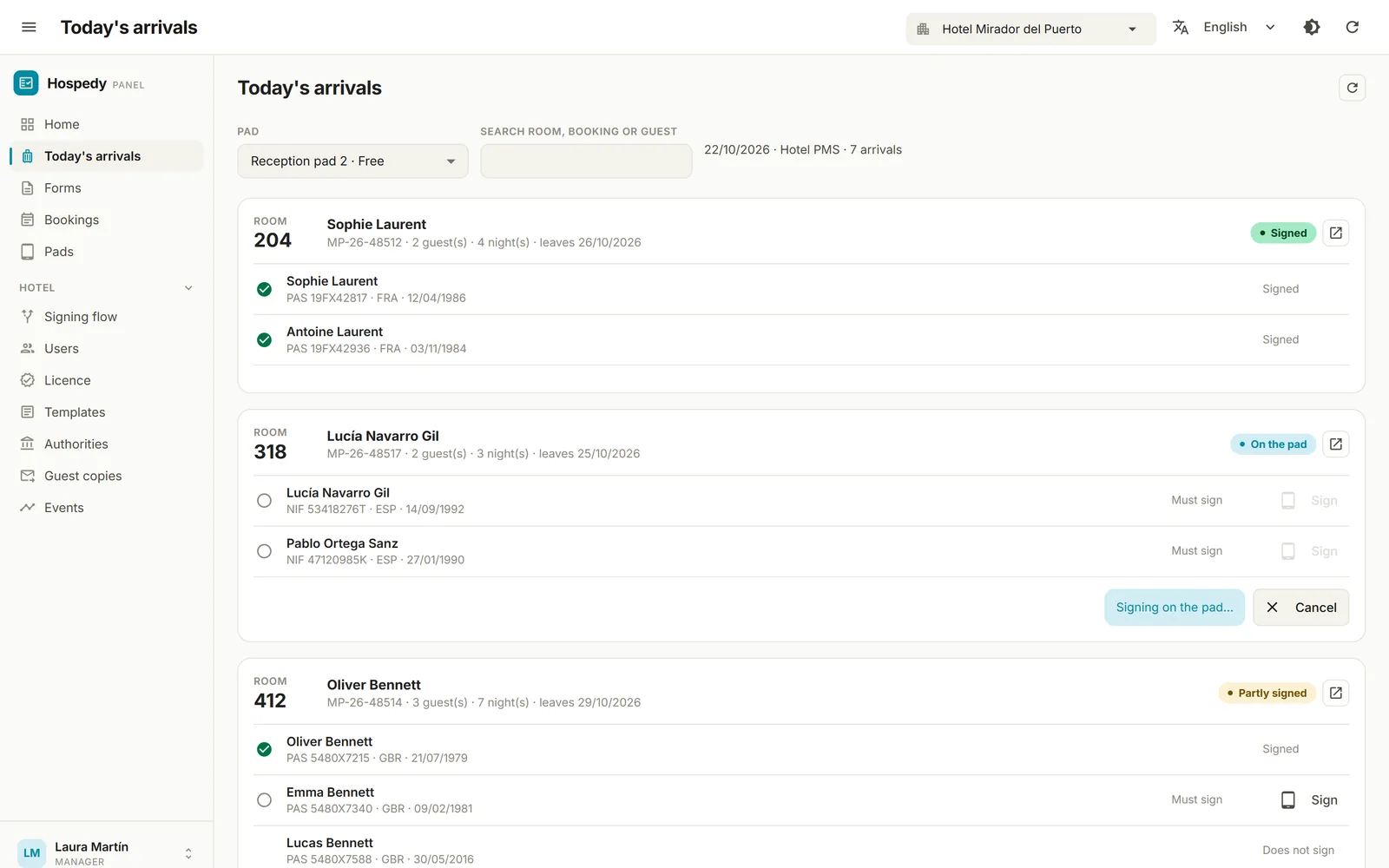
Reception always knows what is still missing
The arrivals screen shows today’s bookings, read from your property management system, with the status of each guest: not sent, on the tablet, partly signed, signed. It refreshes by itself.
- The whole booking or guest by guest. Send the whole family to the tablet or only the guest who still has to sign.
- Complete data before signing. Reception corrects or completes what the authority requires before the guest signs.
- The desk never gets stuck. If a guest leaves halfway, the signature is cancelled and the tablet is released; signatures already collected are kept.
The guest experience
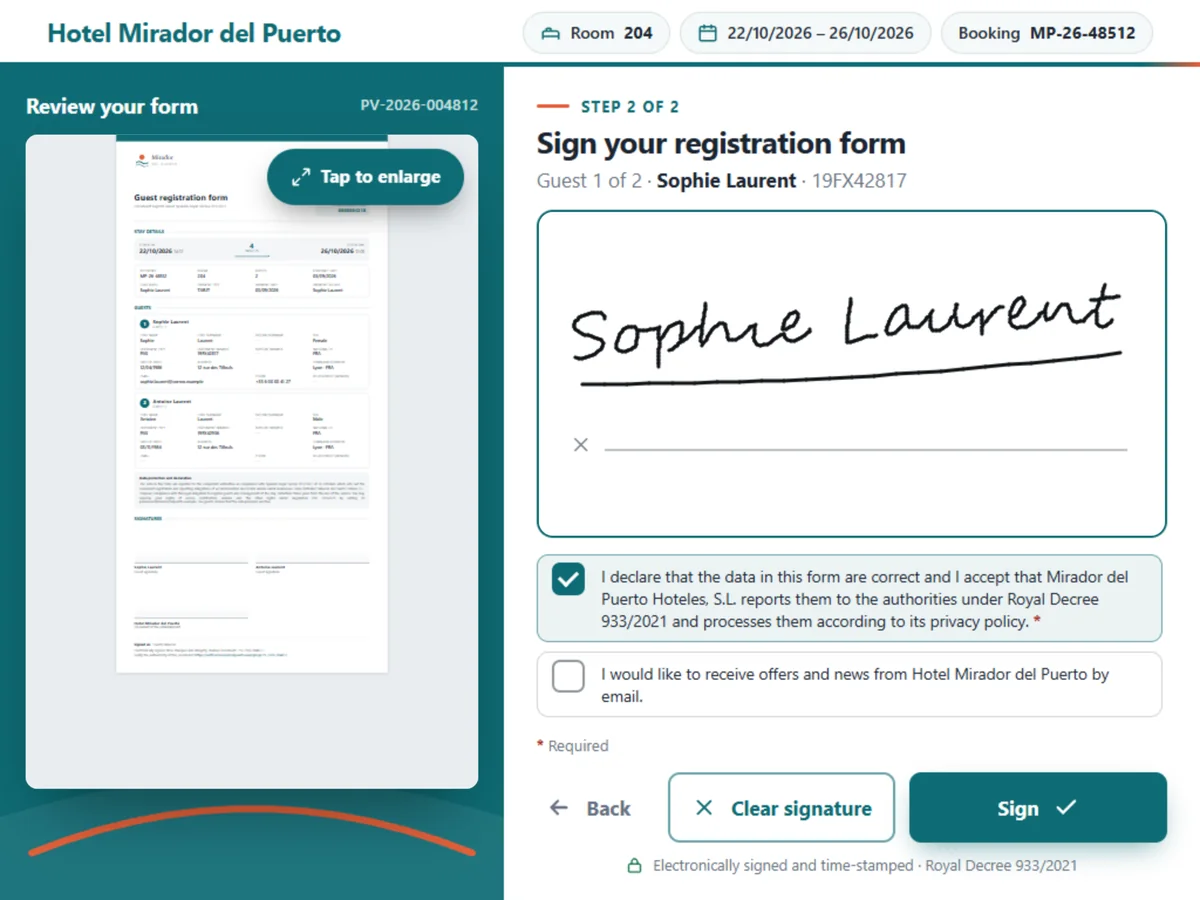
A tablet with your hotel’s branding
Any tablet or touch screen with a web browser will do, with no app to install. It is linked to the hotel with a six-digit code and, if it is lost, it can be disabled from the dashboard.
- In seven languages. Spanish, English, French, Portuguese, German, Italian and Chinese. The form is shown in the guest’s language with the hotel’s language underneath.
- Several signers. Only the lead guest, or every traveller from the age the hotel sets; the tablet passes from one to the next.
- Your own steps. The hotel decides what the guest sees: reviewing their details, correcting their email or phone, accepting consents or answering the hotel’s own questions.
- A showcase when idle. Between signatures, the tablet shows the videos or photos the hotel chooses to promote its services.
Reporting to the authorities
Every registration, to the authority it belongs to
Each country, and sometimes each region, has its own authority and its own format. Hospedy connects to each one through a dedicated connector and picks the right one based on where the property is. Reporting happens in the background: signing and archiving never wait for the authority to respond.
Automatic reporting
Where the authority allows it, Hospedy sends registrations and bookings itself and follows each one until it is accepted. It validates the data before sending and checks the credentials without submitting anything.
Ready for the portal
Where the authority only accepts its own portal, Hospedy prepares the file in its format. Reception uploads it and confirms the submission in the dashboard, where it is recorded.
Your own channel
If your hotel already reports another way, Hospedy delivers every signed registration to your system and you keep the channel you already use.
Available today in Spain: SES.HOSPEDAJES (Ministry of the Interior), Mossos d’Esquadra and Ertzaintza. Operating in another country? Ask us about the authority at your destination.
Custody and evidence
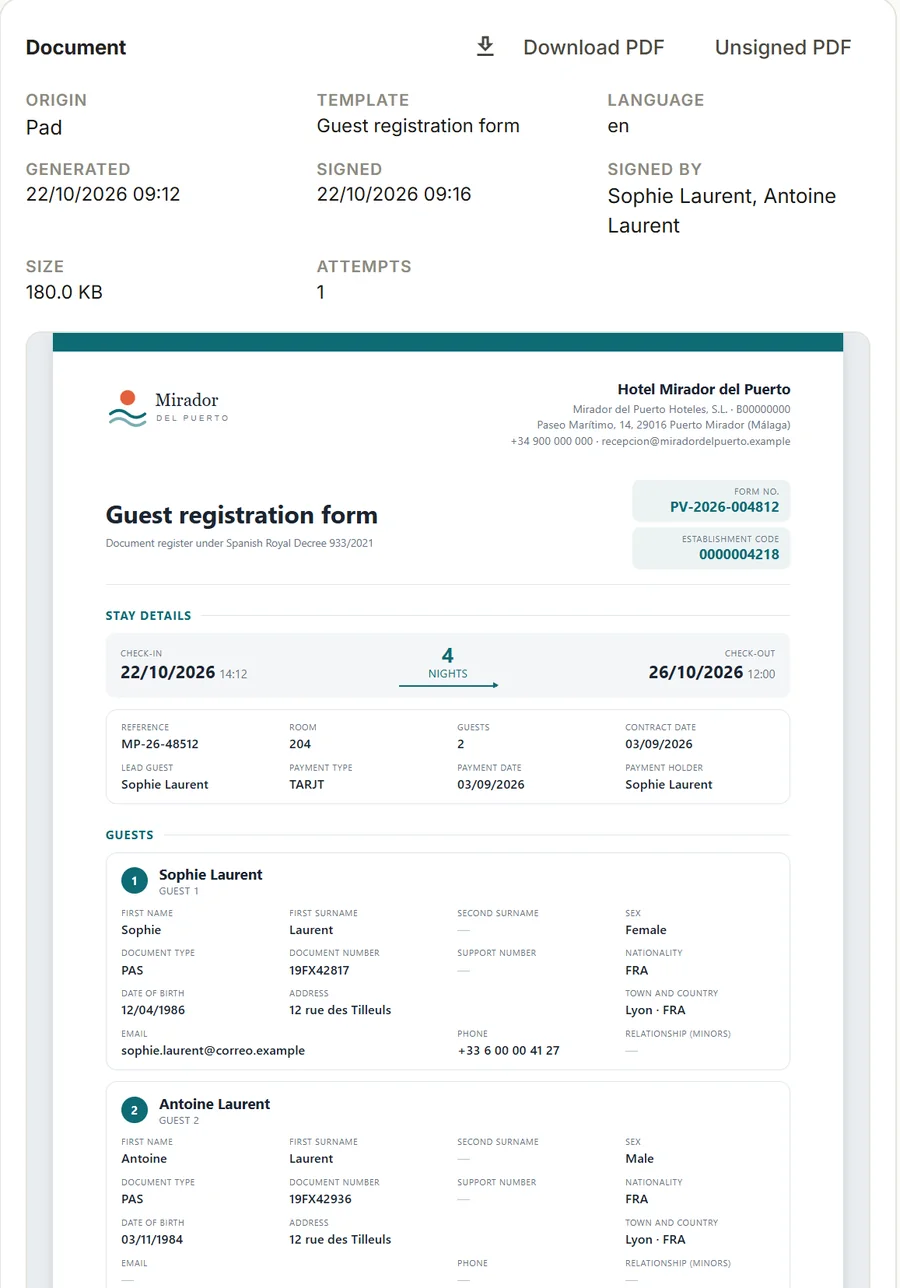
An archive that proves nobody has touched it
Every signed registration is sealed with Roommatik’s certificate and chained to the property’s previous ones. An independent time-stamping authority certifies the date and time of the signature.
- Verifiable with a QR code. The PDF carries a code that opens a public verification page, with no personal data.
- Nothing changes unnoticed. No registration can be altered, inserted or deleted without breaking the chain.
- Automatic retention and deletion. Three years in Roommatik’s cloud in the EU; when the period ends, personal data is deleted automatically.
- In your own systems too. Simultaneous copy to Google Drive, Dropbox, SFTP or S3-compatible storage, with a daily check of every copy.
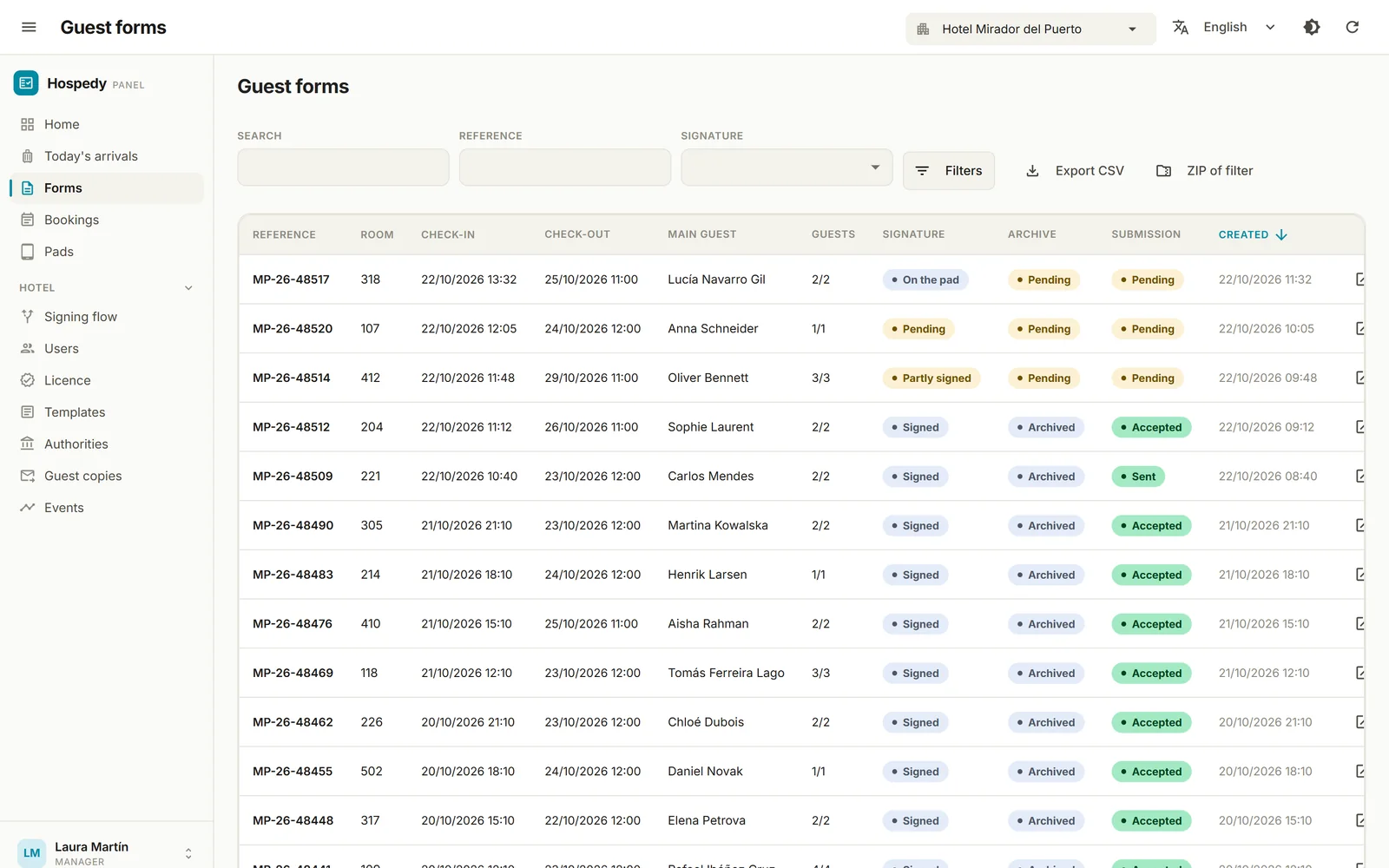
The dashboard
Any registration, in seconds, during an inspection
Search by surname, document, room, nationality or dates, even without accents. Open the PDF right in the dashboard, or download the forms as a ZIP and the list as a CSV.
- All your hotels in one account. Chains switch property from the top bar; each hotel keeps its own settings.
- Everyone sees what they need. Management runs the hotel and its team; Reception sees arrivals and the last week’s registrations, without exporting.
- Traceable access. Every time a registration is viewed or downloaded, the user who did it is recorded.
- A copy for the guest. The signed form reaches them by email, WhatsApp or SMS, with nothing to print.
How to subscribe
Turn on only what you need
Hospedy is made up of five modules. Take them all, or start with one and add the rest whenever you like.
Signature
Signing tablets, several signers and a sealed signed form.
Reporting
Registrations and bookings reported to the authority, with tracking.
Archive
Three-year custody with proof of integrity and a copy in your systems.
Search
Full history with filters, viewer and downloads.
Delivery
A copy of the signed form for the guest by email, WhatsApp or SMS.
Part of Roommatik
The same registration, from any point of check-in
At the front desk
With the signing tablet and the arrivals screen, connected to the hotel’s property management system.
At the kiosk
The Roommatik self-service kiosk reads the guest’s document and hands the signed registration over to Hospedy.
From your own system
An open, documented API lets your property management system or app register guests and bookings, with instant notice of every change.
What we are usually asked before getting started
What do I need to get started?
A tablet or touch screen with a web browser at reception and your credentials for the authority (in Spain, for SES.HOSPEDAJES). There is no app to install: the tablet is linked to the hotel with a six-digit code.
Does Hospedy report bookings as well as registrations?
Yes. With the Reporting module, Hospedy reports to SES.HOSPEDAJES the new bookings, changes and cancellations it receives from your property management system, in the order they happen.
What if my hotel is in Catalonia or the Basque Country?
Hospedy prepares the registration in the format of the Mossos d’Esquadra or Ertzaintza portal. Reception uploads it to the portal and confirms the submission in the dashboard, where it is recorded.
How long are registrations kept?
With the Archive module, three years, as required by Royal Decree 933/2021. When that period ends, personal data is deleted automatically. If you keep a copy in your own systems, retaining that copy is up to you.
Does it integrate with my property management system?
If your system is already connected to Roommatik online check-in, the day’s arrivals and bookings reach Hospedy with no further integration. Any other system can connect through the Hospedy open API.
Does it work outside Spain?
Hospedy is designed to work with each country’s authority through dedicated connectors. Today it reports to the Spanish authorities and can deliver every registration to your own system; ask us about the authority at your destination.
Can I manage several hotels?
Yes. A single account gives access to all your properties, each with its own licence, authority, template and team.
Works with the management system you already have
Hospedy receives arrivals and bookings from the management systems connected to Roommatik, and from any other through its API.
Guest registration with no paper and no typing
Guest signature, reporting to the authorities and custody with proof of integrity in a single service. We will show you Hospedy in a demonstration tailored to your property. No commitment.
Prefer to talk now? Call us on +34 986 262 230